 Firescope
COMPARISON
Firescope vs Firebase Console
The Firebase Console is a project-wide admin panel. Firescope is a dedicated client for working with your Firestore data safely, every day. They are not rivals — hand the data work to Firescope and keep the console for project configuration. Here is what changes in practice.
Feature comparison
| Feature | Firescope | Firebase Console |
|---|---|---|
| Spreadsheet-style table view | tree view only | |
| Field types always visible | type badge on every column | only while editing |
| Sort, filter & row counts | query builder only | |
| Inline editing (type-preserving) | ||
| Automatic backup before destructive writes | ||
| One-click restore with diff preview | ||
| Production guard (type the project ID to confirm) | ||
| Read-only mode | requires IAM setup | |
| CSV export / import | ||
| Operation log (who / when / what) | local + shared with your team | requires Cloud Audit Logs |
| Compare & copy data between environments | ||
| Schema check (mixed types, missing fields) | ||
| Realtime watch with change feed | auto-refresh only | |
| Logical field names (translated column labels) | ||
| Split view, tabs & tab groups | ||
| Localized UI | 9 languages built in | |
| Security rules & index management | ||
| Other Firebase services (Hosting, etc.) | ||
| Price | browsing is free; writes need Pro (≈$10/mo) | free |
Supported Partial / needs setup Not available
Difference #1: production writes are protected by design
The Firebase Console has no undo. Deletes and overwrites apply instantly and irreversibly. In Firescope, every write goes through a mandatory pipeline — confirm → automatic backup → execute → operation log — and destructive operations on production-labeled connections require typing the project ID.
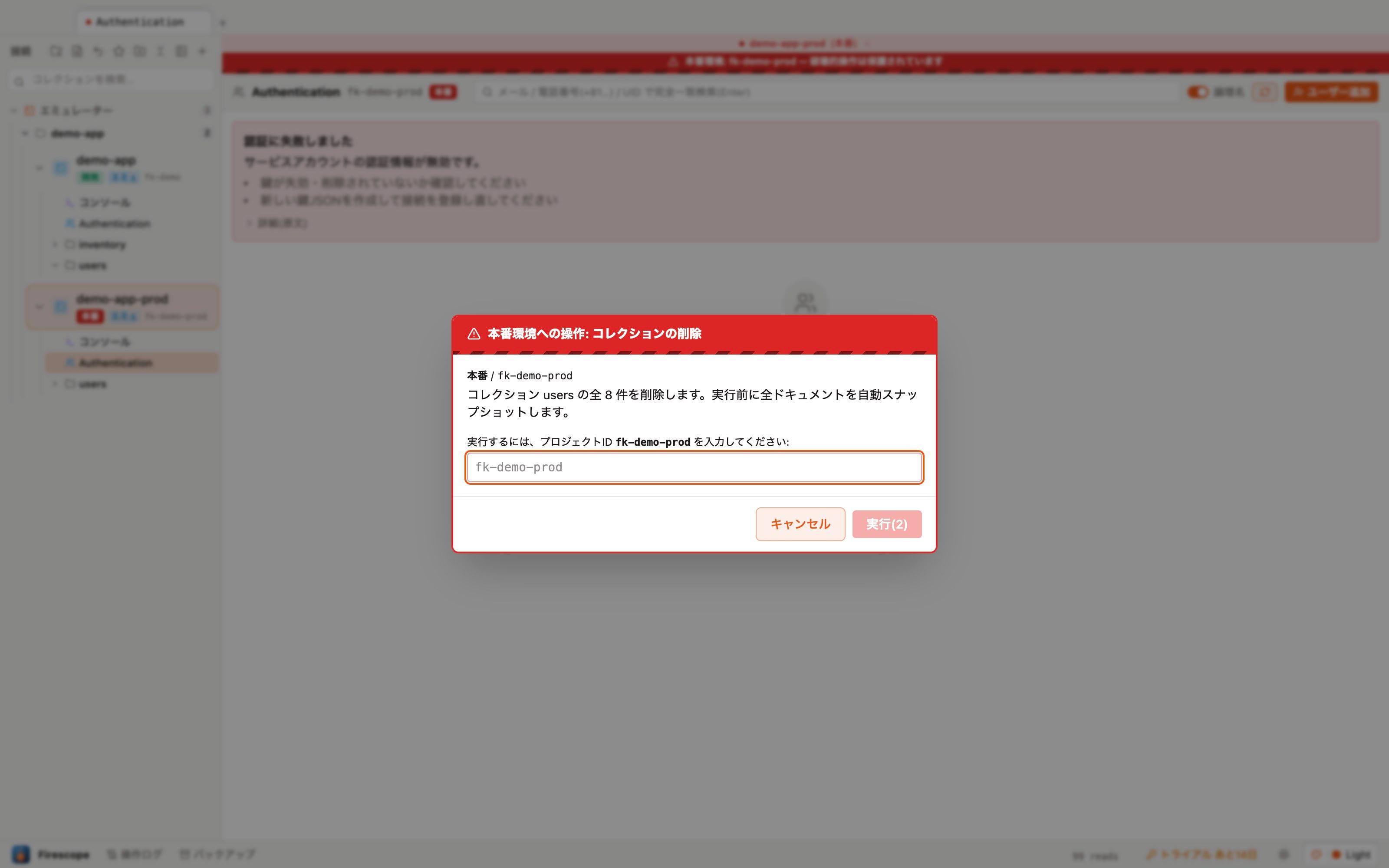
And if something still goes wrong, restore from the automatic pre-operation backup with a diff preview, in one click.
Difference #2: a table, not a tree
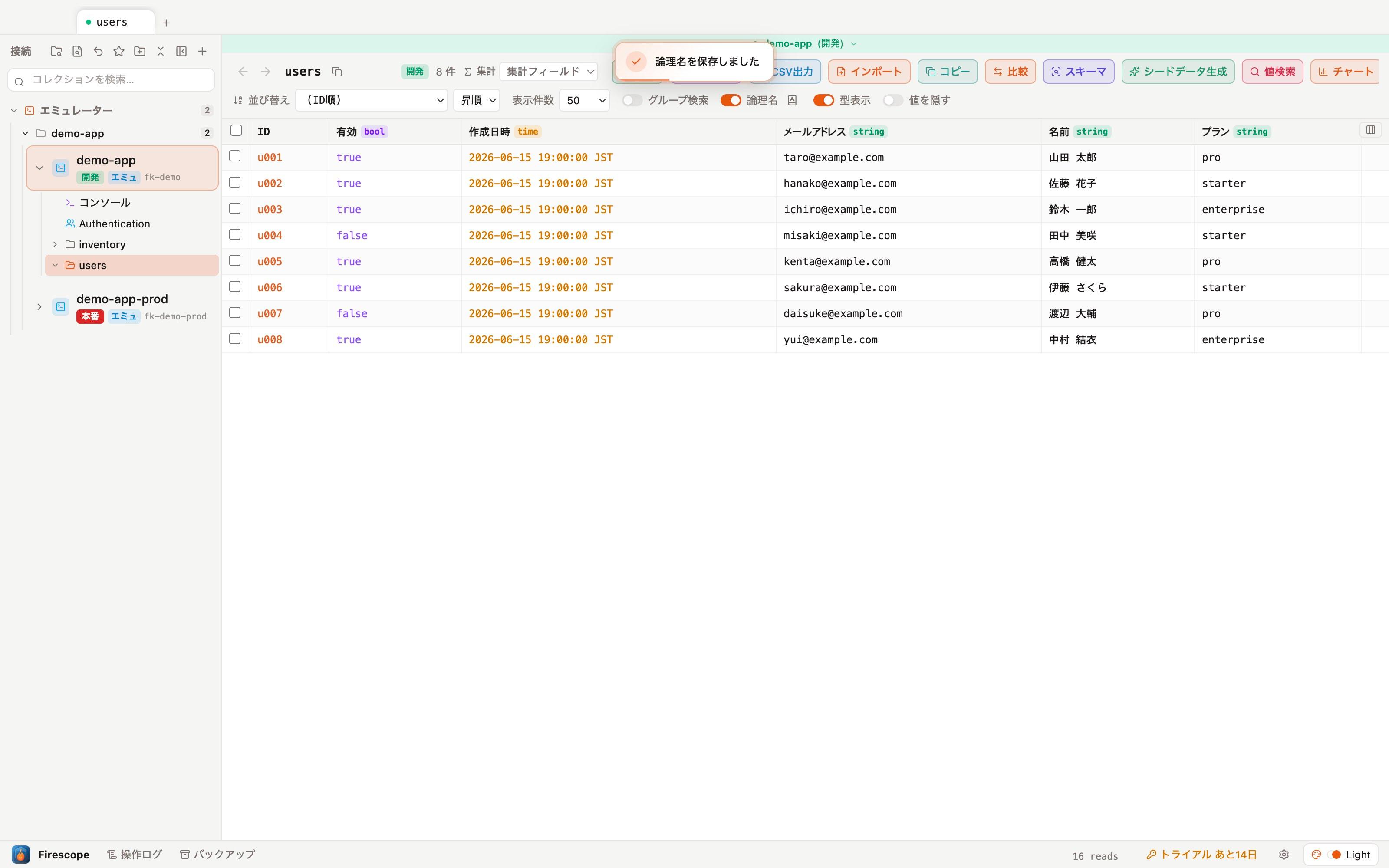
The console makes you dig through documents one by one. Firescope opens any collection as a spreadsheet-style grid with a type badge on every column — sort, filter, group-search, and export/import CSV right there. Column names can even be displayed as translated logical names.
Difference #3: who did what, when — recorded
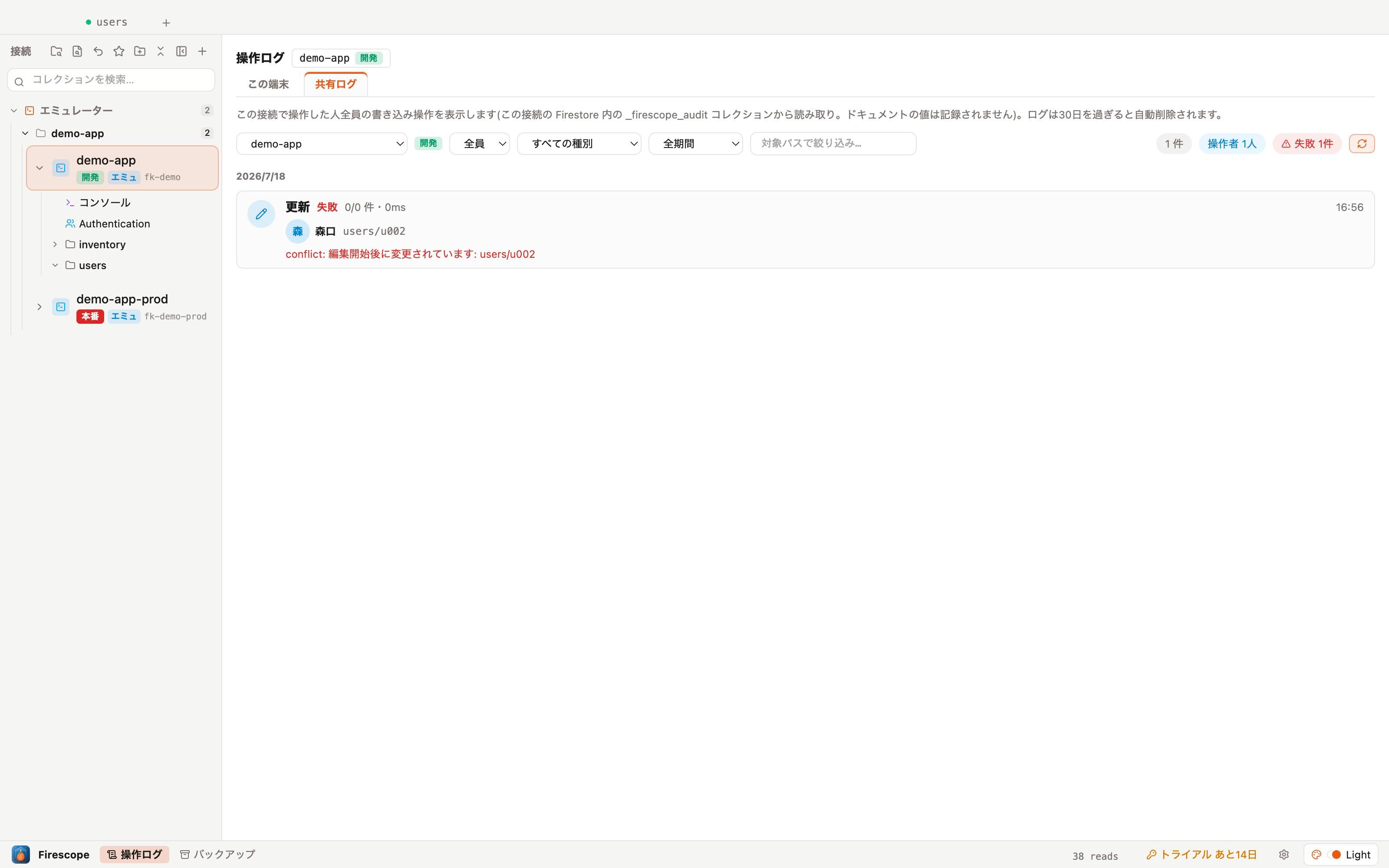
Tracing console operations requires Cloud Audit Logs and BigQuery skills. Firescope records every write to an operation log automatically, and with the shared log enabled your whole team can see who changed what — right inside the app.
When the Firebase Console is enough
To be fair, you may not need Firescope if:
- You almost never touch Firestore by hand (all writes go through your app)
- Your work centers on security rules and indexes
- You have a few dozen documents and never need to list, compare or bulk-edit
But if your team checks and fixes operational data daily, switches between dev and production, or includes non-engineers who need to read data, Firescope pays for itself in saved time and avoided accidents.
FAQ
Can Firescope fully replace the Firebase Console?
For day-to-day data work (Firestore documents and Authentication users), yes. Security rules, indexes, and other Firebase services (Hosting, Functions, etc.) remain the console's job. The sweet spot: use Firescope for data, and the console for project configuration.
Is it safe? Is my data sent anywhere?
Your service-account key is encrypted with a key derived from the macOS Keychain / Windows DPAPI and stored locally only. The app talks directly to Firestore — your database contents are never sent to any external server.
How much can I use for free?
Everything is unlocked for 14 days from first launch — no sign-up, no credit card. After that, browsing, searching and running queries stay free forever. Editing features (writes, restore) and exports (CSV and others) require a Pro license (¥1,480/mo, ≈$10).
I'm afraid of accidentally deleting production data.
That is exactly what Firescope is built for. Every write goes through a mandatory pipeline — confirm → automatic backup → execute → operation log — and destructive operations on production-labeled connections require typing the project ID. If something still goes wrong, restore from the automatic backup with a diff preview in one click.
Try everything free for 14 days
No sign-up, no credit card. Download and connect to your Firestore project — browsing stays free forever.
Download (Mac / Windows)